 Motionflare
Цены Motion.so и альтернативы: какой процесс вам подойдёт?
Выбирайте Motion.so, если нужны интеграции с агентами и ручная правка отдельных элементов. Выбирайте Motionflare, если нужен пошаговый процесс Сайт в видео: публичная страница продукта превращается в маркетинговый ролик с музыкой под монтаж, вы смотрите предпросмотр, а изменения просите в чате.
Новые аккаунты Motionflare получают 6 разовых кредитов без банковской карты на предпросмотр в браузере с водяным знаком длительностью до 10 секунд. Можно платить по мере работы, начиная с пакета кредитов за $15 (40 кредитов, без подписки), или оформить подписку от $29 в месяц для постоянного экспорта. Оба платных пути дают MP4 в 1080p или 4K без водяного знака.
Цены Motion.so ниже взяты из снимка за август 2026 года и подтверждены сохранёнными скриншотами страницы тарифов. Перед покупкой проверьте актуальные условия Motion: кредиты и стоимость готового ролика у двух продуктов не взаимозаменяемы.
Motionflare и Motion (motion.so): краткое сравнение
| Motionflare | Motion (motion.so) | |
|---|---|---|
| Кому подходит | Маркетинговые, продуктовые и рекламные ролики в фирменном стиле по сайту или одной фразе | Тем, кто ведёт моушн-дизайн промптами и агентами: запуски, демо, объяснения, реклама и не только |
| Характер результата | Motion: цельный ролик с моушн-графикой из настоящих материалов сайта и фирменного стиля, с музыкой под монтаж. Режим Film: игровой имиджевый ролик от 5 до 45 секунд, с озвучкой и музыкой | Ролики в моушн-дизайне с озвучкой, музыкой и субтитрами |
| С чего начинается работа | Со ссылки на действующий сайт или одной фразы в пошаговом веб-процессе | С текстового промпта, сайта, загруженных материалов, референсов стиля или вызова из агента |
| Попадание в фирменный стиль | Автоматически в режиме сайта: считывает логотип, цвета, тексты и скриншоты по ссылке | Читает ваш сайт, чтобы понять цвета, типографику и референсы |
| Глубина правок | Правки ролика через чат прямо в браузере | Чат плюс перетаскивание, изменение размера и ручная правка отдельных элементов |
| MCP и API | Только веб-приложение | Поддержка MCP и API для Claude, ChatGPT, Cursor и других агентов |
| ИИ-аватары | Нет библиотеки аватаров и ведущих. Режим Film подбирает в кадр сгенерированных людей | Нет, фокус на моушн-дизайне |
| Как оценить бесплатно | 6 разовых кредитов; предпросмотр в браузере с водяным знаком, до 10 секунд | Бесплатного тарифа на странице продукта нет; самый дешёвый платный вход: Flex за $5 |
| Цена | Пакет кредитов за $15 (40 кредитов, без подписки) или $29/мес. (Pro, 100 кредитов в месяц) | Flex $5 разово (200 кредитов, без подписки), Pro $29/мес. (1250 кредитов, примерно 4 ролика по минуте), Max $99/мес. (5000 кредитов) |
Данные о Motion (motion.so) актуальны на август 2026 (по открытым страницам продукта и тарифов). Свежую информацию уточняйте на сайте сервиса.
Когда стоит выбрать Motion (motion.so)
Motion (motion.so) подойдёт лучше, если:
- Вы хотите запускать генерацию видео прямо из агентных сценариев, вызывая инструмент из Claude, ChatGPT или Cursor по MCP.
- Вы хотите перетаскивать, масштабировать и править отдельные визуальные элементы после генерации, а не просить изменения в чате.
- Вам нужен более широкий холст для промптов: документальные форматы, дополнение «говорящей головы», анимация логотипа и другие задачи за пределами продуктового маркетинга.
Когда Motionflare подходит лучше
Пошаговый процесс, который начинается со ссылки
Motionflare начинает с публичного сайта или описанной словами идеи и планирует весь ролик по ритмической сетке. Режим сайта даёт тексты, скриншоты, логотип и визуальные ориентиры, а сам ролик пишется как одна программа со своей музыкой.
Старт без банковской карты
При регистрации в Motionflare даётся 6 разовых кредитов на предпросмотр с водяным знаком длительностью до 10 секунд. Тариф Pro стоит $29 в месяц за 100 кредитов. Видео оплачивается посекундно в зависимости от модели, экспорт тоже расходует кредиты, поэтому число готовых роликов зависит от длины и модели.
Опубликованные цены и более простое решение
Motionflare публикует и кредиты тарифов, и стоимость экспорта. Если команде нужно получить маркетинговый ролик в сфокусированном веб-приложении, а не собирать агентный стек, путь от ссылки до предпросмотра в браузере намеренно проведён за руку.
Что Motionflare делает из публичного сайта
- На входе
- Ссылка на публичную страницу продукта
- На выходе
- Моушн-графика в фирменном стиле с озвучкой, субтитрами и музыкой
Что такое Motion.so?
На motion.so работает Motion by Mosaic, продукт для моушн-дизайна с помощью ИИ. Это не приложение-календарь и планировщик задач Motion, которое живёт на usemotion.com. Из-за совпадения названий запросы вроде «Motion цены» или «приложение Motion» смешивают два никак не связанных продукта.
Продукт на motion.so описывает себя как передовой агент для моушн-дизайна. Вы даёте предложение, сайт, материалы или референсы; Motion изучает контекст, предлагает раскадровку и стилевое направление, собирает сцены и позволяет дальше править результат. Он также открывает доступ по MCP и API для агентных сценариев.
Motion.so и Motionflare: процесс и правки
Продукты пересекаются сильнее, чем можно решить по простому противопоставлению «промпт против ссылки»: оба умеют читать сайт, делать моушн-дизайн и реагировать на чат. Motion даёт более широкую творческую поверхность и более тонкую правку на уровне элементов. Motionflare даёт проведённый за руку путь от публичной ссылки к одному маркетинговому ролику с музыкой под монтаж и озвучкой по желанию.
Поэтому Motion сильнее там, где нужны точечные правки, коннекторы, MCP или нестандартные форматы. Motionflare сильнее там, где задача в том, чтобы понятно объяснить тему или превратить действующий сайт в цельный ролик, не режиссируя каждый элемент.
Цены Motion.so в 2026 году: Flex, Pro и Max
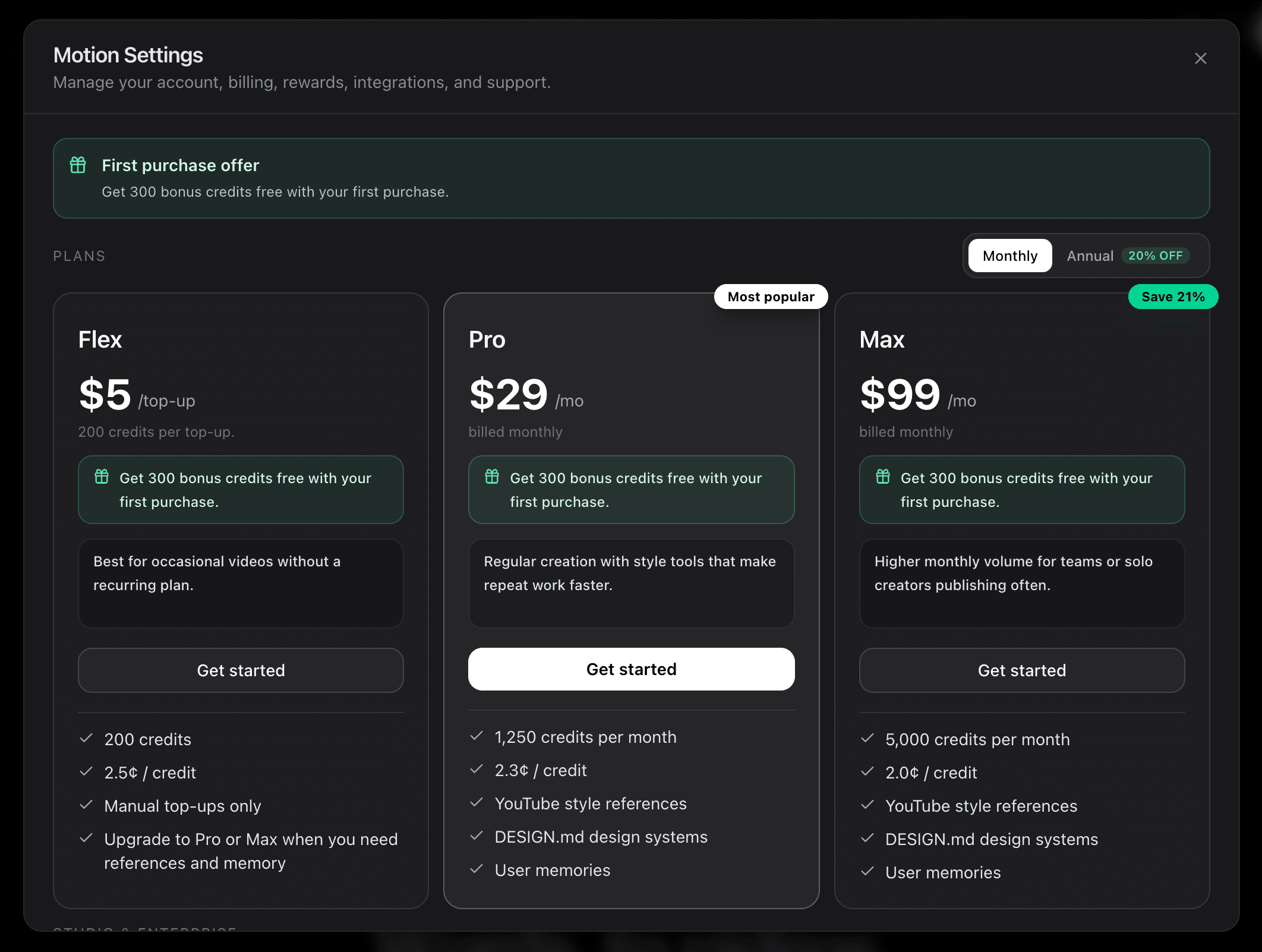
По данным motion.so, проверенным в августе 2026, Motion продаёт три тарифа. Flex стоит $5 за разовое пополнение на 200 кредитов по 2,5 цента за кредит и не требует подписки. Pro стоит $29 в месяц за 1250 кредитов по 2,3 цента. Max стоит $99 в месяц за 5000 кредитов по 2,0 цента. Бесплатного тарифа в панели цен нет, поэтому дешевле всего попробовать сервис на Flex, а за первую покупку начисляют 300 бонусных кредитов. Не путайте всё это с ценами usemotion.com: они относятся к никак не связанному приложению-календарю и планировщику задач.
Motionflare стоит $29 в месяц за 100 кредитов на Pro и $99 в месяц за 500 кредитов на Max, плюс 6 разовых кредитов при регистрации без банковской карты. Видео оплачивается за каждую секунду готового ролика по ставке, которую задаёт модель, а экспорт стоит 2 кредита в 1080p или 3 кредита в 4K. Без подписки пакеты кредитов начинаются с $15 за 40 кредитов, которые не сгорают.
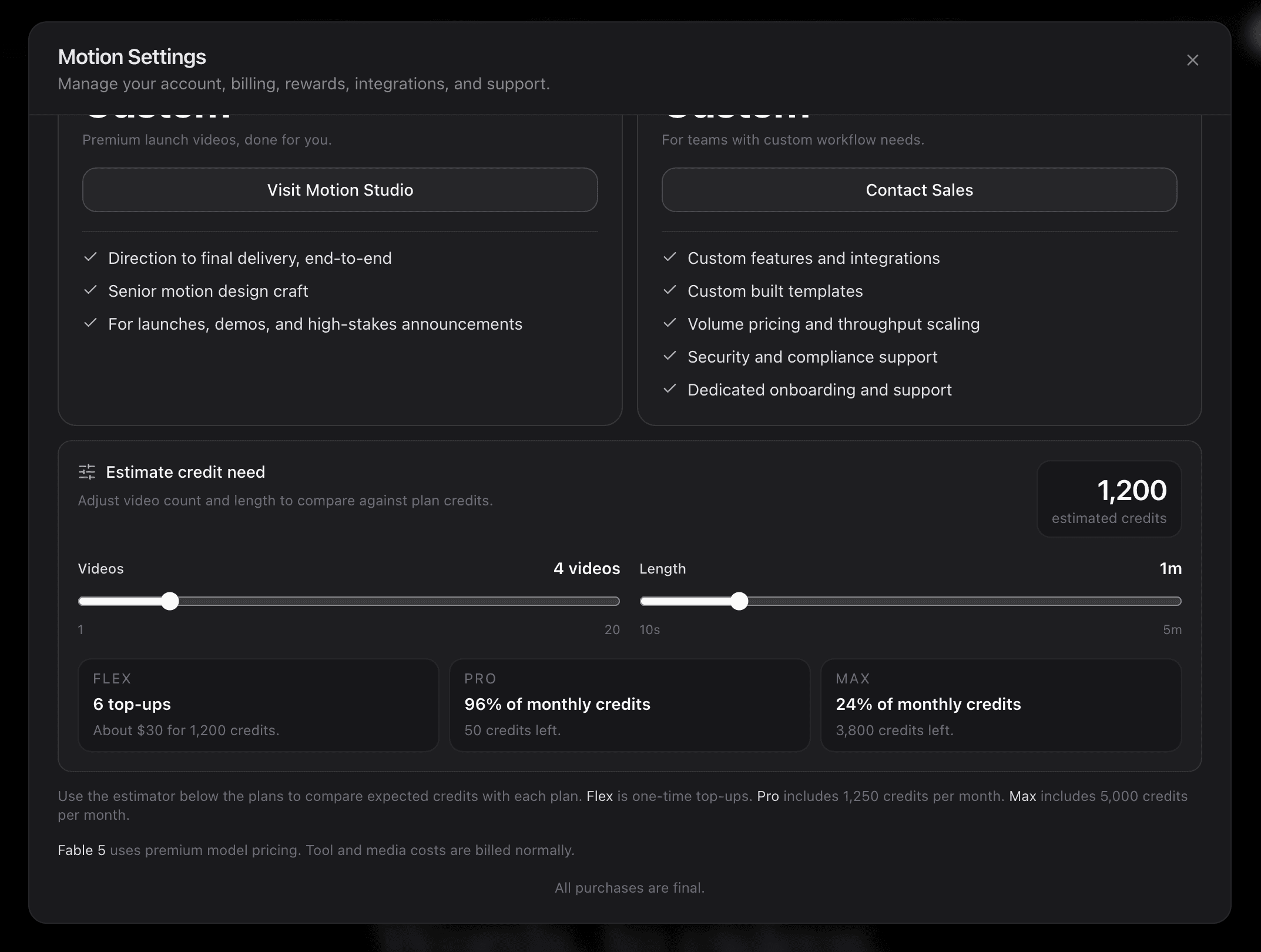
Суммы кредитов напрямую не сравниваются. На снимке калькулятора Motion четыре ролика по минуте выходят в 1200 кредитов. Motionflare берёт за секунду видео в зависимости от модели: от 0,5 кредита в секунду на Claude Haiku 5.5 до 1,8 на Claude Opus 5.5 (модель по умолчанию на платных тарифах) и 3,6 на GPT-6 Astra и Claude Fable 5.1, плюс 2 кредита за экспорт в 1080p или 3 за 4K. По цене кредита на Pro минутный ролик с экспортом в 1080p стоит 32 кредита (около $9,30) на Claude Haiku 5.5 или 110 кредитов (около $31,90) на Claude Opus 5.5. Это дороже за готовую минуту, чем примерно $6,90, которые следуют из калькулятора Motion, хотя две оценки сделаны не по одному и тому же брифу. Правки в чате тоже расходуют кредиты.
Как выбрать подходящую альтернативу Motion.so
Не сравнивайте только списки функций. Дайте обоим инструментам одну и ту же ссылку на действующий продукт, целевую длительность, аудиторию и призыв к действию. Сравните, насколько точно каждый понял продукт, сколько правок требует первый вариант, какая модель редактирования удобнее вашей команде и во сколько в итоге обойдётся нужный вам экспорт.
Motionflare позволяет начать такой тест с 6 разовыми кредитами и без карты. Уточните актуальные условия доступа Motion на motion.so и прогоните там тот же бриф. Тест на одинаковом входе полезнее любого общего рейтинга.
Как попробовать Motionflare
- 1Создайте бесплатный аккаунт Motionflare. Карта не нужна.
- 2Вставьте ссылку на действующий сайт или опишите нужный ролик одной фразой.
- 3Выберите длительность и формат; при желании включите озвучку.
- 4Смотрите превью ролика в браузере и просите об изменениях в чате. Бесплатный аккаунт даёт просмотр до 10 секунд с водяным знаком.
- 5Платите на этапе экспорта: пакет кредитов за $15 без подписки или подписка от $29 в месяц для постоянной работы. Оба варианта дают 1080p или 4K без водяного знака.
Частые вопросы
Что такое Motion.so?
Motion.so, он же Motion by Mosaic, представляет собой ИИ-агента для моушн-дизайна, который делает ролики к запуску, демонстрации продукта, объясняющие видео, анимации логотипа и рекламу из промптов, сайтов, материалов и референсов. Он берёт на себя исследование темы, раскадровку, создание сцен, озвучку, музыку, субтитры и правки в одном процессе.
Это одно и то же: Motion.so и приложение-календарь Motion?
Нет. Motion.so делает компания Mosaic, это продукт для моушн-дизайна и видео. Календарь, планировщик задач и приложение для продуктивности живут на usemotion.com. Их цены, функции и аккаунты никак не связаны.
Сколько стоит Motion.so?
По состоянию на август 2026 у Motion.so три тарифа: Flex за $5 за разовое пополнение на 200 кредитов (2,5 цента за кредит), Pro за $29 в месяц за 1250 кредитов (2,3 цента) и Max за $99 в месяц за 5000 кредитов (2,0 цента). Собственный калькулятор Motion оценивает четыре ролика по минуте в 1200 кредитов, так что готовая минута стоит около 300 кредитов, примерно $6,90 на Pro.
Сколько роликов можно сделать на тарифе Motion.so Pro?
Motion.so Pro стоит $29 в месяц за 1250 кредитов, а собственный калькулятор Motion оценивает четыре ролика по минуте в 1200 кредитов и показывает это как 96% месячного лимита. То есть месяца на Pro хватает примерно на четыре готовые минуты. Калькулятор считает и количество роликов, и их длину, поэтому длинные ролики расходуют пропорционально больше.
Motion.so бесплатен?
В снимке цен Motion.so за август 2026 бесплатного тарифа нет: дешевле всего войти через Flex: $5 разово за 200 кредитов, без подписки. Motionflare даёт 6 разовых кредитов при регистрации без банковской карты на предпросмотр в браузере с водяным знаком длительностью до 10 секунд, а не на полноценный экспорт без водяного знака.
Чем Motionflare отличается от Motion.so?
Оба генерируют ролики в моушн-дизайне с помощью ИИ, умеют читать сайт и обходятся без синтетических ведущих. Motion даёт более широкий холст для промптов, правку на уровне элементов, коннекторы, MCP и доступ по API. Motionflare работает через пошаговый процесс, который начинается со ссылки, и пишет весь ролик вокруг бренда-источника.
Что лучше для ролика к запуску продукта?
Если нужно понятно объяснить идею или превратить действующий сайт в цельный ролик в фирменном стиле, Motionflare ведёт вас за руку и подойдёт лучше. Если нужны точечные правки элементов, коннекторы, агентная автоматизация или более широкий круг форматов, лучше может подойти Motion. Прогоните один и тот же бриф через оба, прежде чем выбирать.
Поддерживает ли Motionflare MCP и агентные интеграции, как Motion?
Нет. Motionflare работает через веб-приложение и не публикуется как инструмент для агентов. Если вызов генерации видео из Claude, ChatGPT, Cursor или другого MCP-клиента является для вас жёстким требованием, лучше подойдёт Motion.
Сколько стоит Motionflare по сравнению с Motion?
Motionflare Pro стоит $29 в месяц за 100 кредитов, Max стоит $99 за 500. Бесплатный аккаунт получает 6 разовых кредитов на предпросмотр с водяным знаком длительностью до 10 секунд; без подписки экспорт открывает пакет кредитов за $15 (40 кредитов). В августовском снимке Motion тариф Pro тоже стоит $29, но кредиты там покупают другие действия. Сравнивайте стоимость своего реального брифа вместе с правками, а не суммы кредитов и не предполагаемые минуты.
Что можно попробовать бесплатно и за что нужно платить при экспорте?
Регистрация в Motionflare бесплатна и не требует карты. Начисленные 6 кредитов дают предпросмотр в браузере с водяным знаком длительностью до 10 секунд. Чтобы убрать водяной знак и скачать MP4, нужен либо пакет кредитов (от $15 за 40 кредитов, без подписки), либо подписка Pro или Max. В августовском снимке Motion за 2026 год бесплатного тарифа не было.
Ваша идея заслуживает понятной истории.
Сделайте ролик с моушн-графикой или игровую рекламу по ссылке или одной фразе, сразу в фирменном стиле. Перед экспортом превью можно посмотреть бесплатно.
Создать видео