 Motionflare
Motion.so pricing and alternatives: which workflow fits?
Choose Motion.so for agent integrations and hands-on editing of individual elements. Choose Motionflare for a guided URL to video workflow: turn a public product page into a scored marketing video, preview the cut, then request changes in chat.
Motionflare gives new accounts 6 one-time credits with no card, for a watermarked browser preview up to 10 seconds. Pay as you go from $15 with a credit pack (40 credits, no subscription), or subscribe from $29/month for ongoing exports. Both paid paths produce watermark-free 1080p or 4K MP4.
The Motion.so prices below are an August 2026 snapshot backed by captured pricing screens. Check Motion’s current terms before buying; credits and finished-video costs are not interchangeable between the two products.
Motionflare vs Motion (motion.so) at a glance
| Motionflare | Motion (motion.so) | |
|---|---|---|
| Best for | On-brand marketing, product, and ads videos from a live website or one sentence | Prompt- and agent-driven motion design across launches, demos, explainers, ads, and more |
| Output style | Motion: a scored motion-graphics video built from website assets and brand cues. Film mode: a live-action brand film of 5 to 45 seconds, with voiceover and music | Motion-design videos with voice-over, music, and captions |
| Starting point | A live website URL, or one sentence, in a guided web workflow | A text prompt, website, uploaded assets, style references, or an agent call |
| Brand matching | Automatic in Website mode, reads logo, colors, copy, and screenshots from the URL | Reads your site to learn colors, type, and references |
| Editing control | Chat revisions of the video in the browser | Chat plus drag, resize, and manual editing of individual elements |
| MCP / API | Web app only | MCP and API support for Claude, ChatGPT, Cursor, and other agents |
| AI avatars | No avatar library or presenter. Film mode casts generated people into scenes | None; motion design focus |
| Free evaluation | 6 one-time credits; watermarked browser preview up to 10 seconds | No free tier listed on the product page; Flex at $5 is the lowest paid entry |
| Pricing | $15 credit pack (40 credits, no subscription), or $29/mo (Pro, 100 credits per month) | Flex $5 one-time (200 credits, no subscription), Pro $29/mo (1,250 credits, about four one-minute videos), Max $99/mo (5,000 credits) |
Motion (motion.so) details verified as of August 2026 from public pricing and product pages. Check the vendor’s site for current details.
When Motion (motion.so) is the right choice
Motion (motion.so) is the better choice when:
- You want to drive video generation from inside agent workflows, calling the tool from Claude, ChatGPT, or Cursor over MCP.
- You want to drag, resize, or edit individual visual elements after generation instead of requesting changes in chat.
- You need a broader prompt-led canvas for documentaries, talking-head augmentation, logo animation, or other formats beyond product marketing.
Where Motionflare fits better
A guided, URL-first workflow
Motionflare starts with a public website or a written idea, then plans the whole video on a beat grid. Website mode supplies the copy, screenshots, logo and visual cues; the video is written as one code program with its own score.
Start without a credit card
Motionflare includes 6 one-time signup credits for a watermarked preview up to 10 seconds. Pro is $29/month for 100 credits. Video is priced per second by model and export uses credits too, so the number of finished videos depends on length and model.
Published costs and a simpler decision
Motionflare publishes its plan credits and export costs. For a team that wants a marketing video out of a focused web app rather than a connected agent stack, the path from URL to browser preview is deliberately guided.
What Motionflare produces from a public website
- Input
- A public product page URL
- Output
- On-brand motion graphics with voice-over, captions, and music
What is Motion.so?
Motion.so is the website for Motion by Mosaic, a product for AI-assisted motion design. It is not the Motion calendar and task-management app hosted at usemotion.com. The shared name is why searches for “Motion pricing” or “Motion app” can mix two unrelated products.
The motion.so product describes itself as a frontier agent for motion design. You provide a sentence, website, assets, or references; Motion researches the context, proposes a storyboard and style direction, builds the scenes, and lets you continue editing the result. It also exposes MCP and API access for agent workflows.
Motion.so vs Motionflare: workflow and editing
The products overlap more than a simple prompt-versus-URL label suggests: both can read a website, make motion design, and respond to chat. Motion offers the broader creative surface and finer element-level editing. Motionflare offers a guided path from a public URL to one scored marketing video, with optional narration.
That makes Motion the stronger fit when granular editing, connectors, MCP, or unusual formats are requirements. Motionflare is the stronger fit when the job is to explain a topic clearly or turn a live website into a cohesive video without directing every element.
Motion.so pricing in 2026: Flex, Pro, and Max
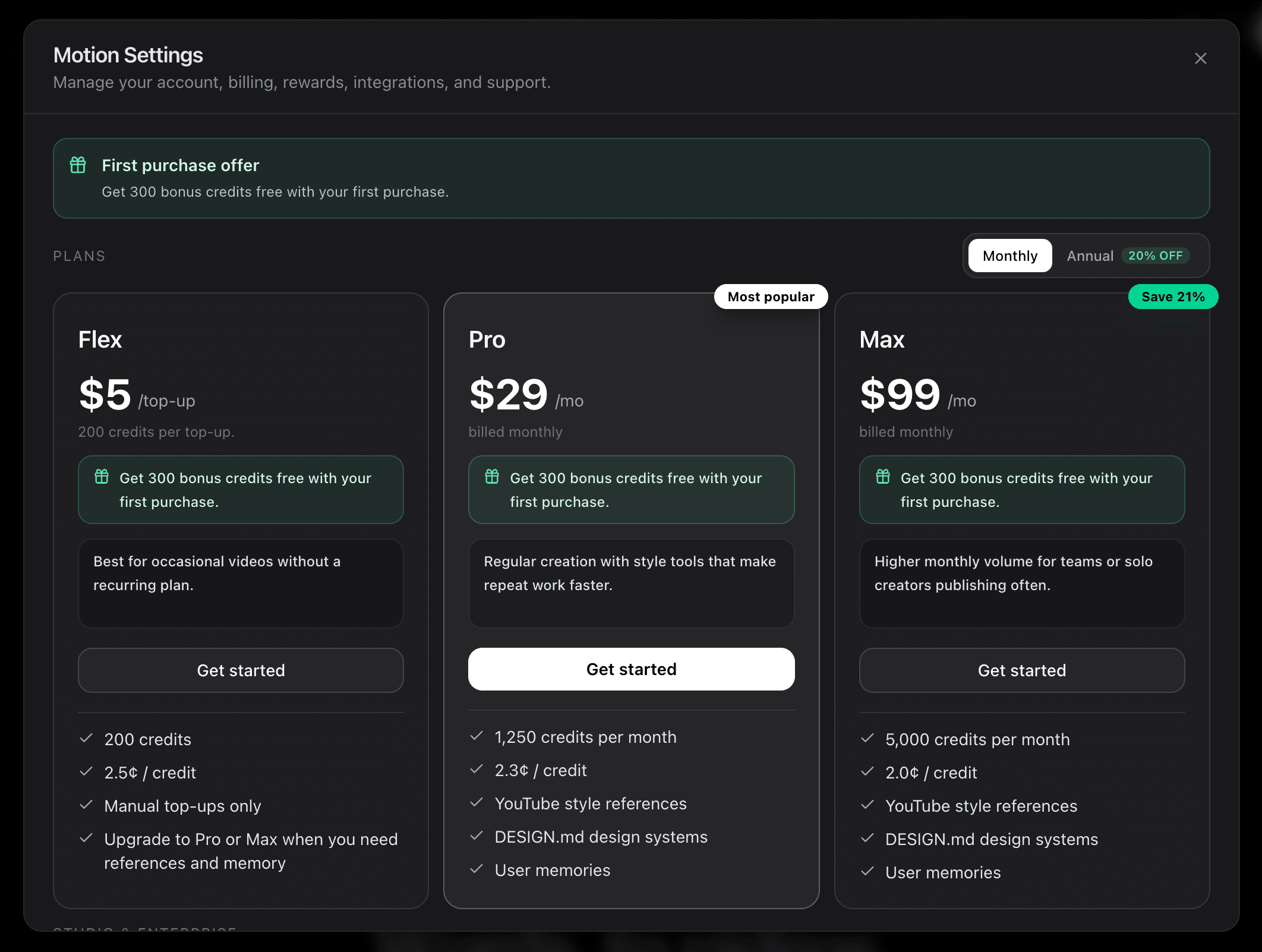
As published on motion.so and verified in August 2026, Motion sells three plans. Flex is $5 per one-time top-up for 200 credits at 2.5¢ a credit, with no subscription. Pro is $29 per month for 1,250 credits at 2.3¢ a credit. Max is $99 per month for 5,000 credits at 2.0¢ a credit. The pricing panel lists no free tier, so Flex is the cheapest way to try it, and a first purchase adds 300 bonus credits. Do not confuse any of this with usemotion.com pricing, which belongs to the unrelated calendar and task app.
Motionflare is $29 per month for 100 credits on Pro and $99 per month for 500 credits on Max, plus 6 one-time signup credits that need no card. Video is priced per finished second at a rate set by the model, and export costs 2 credits at 1080p or 3 credits at 4K. Without a subscription, credit packs start at $15 for 40 credits that never expire.
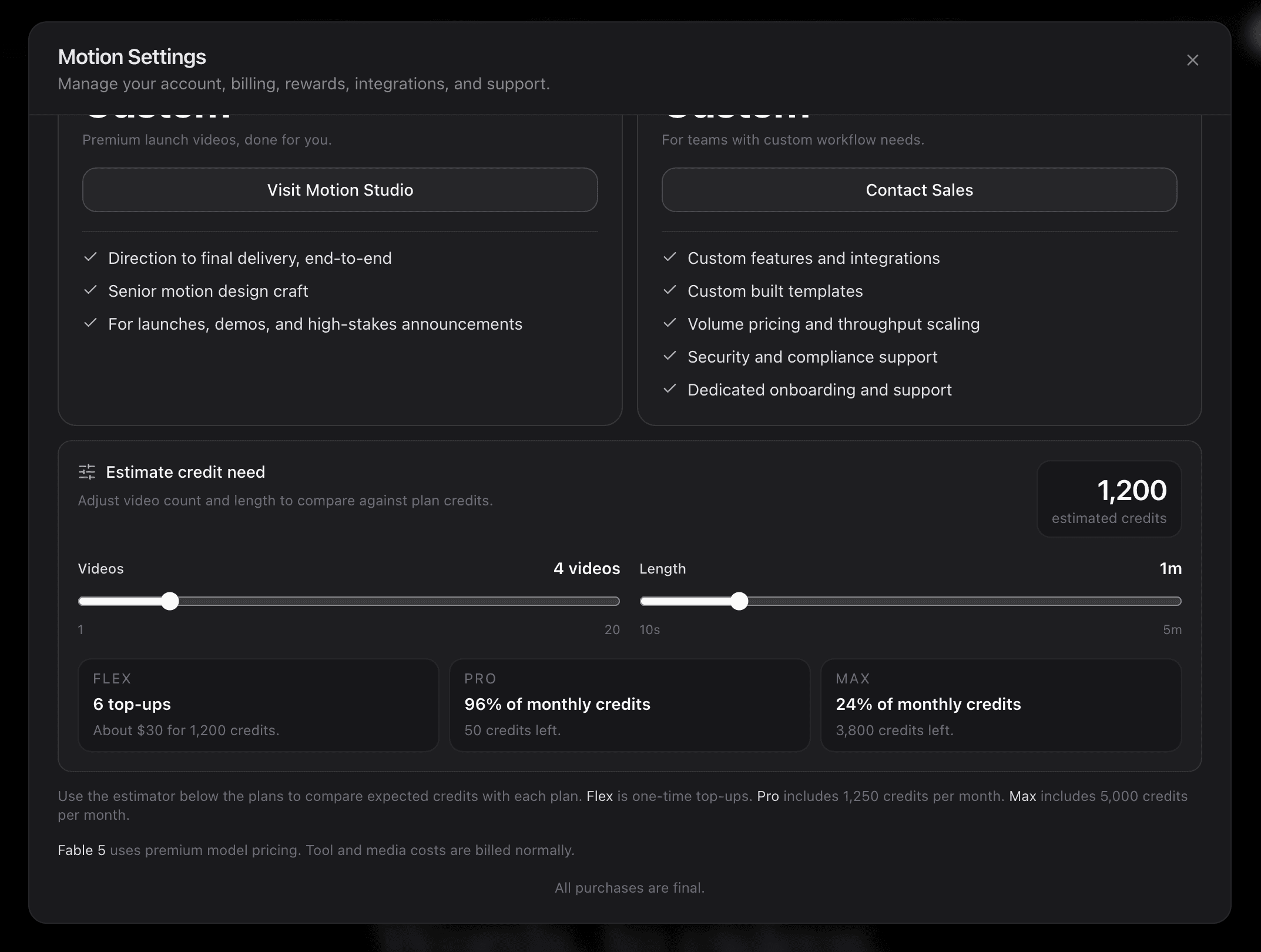
Credit totals cannot be compared directly. Motion’s captured estimator shows four one-minute videos using 1,200 credits. Motionflare charges per second of video by model, from 0.5 credits a second on Claude Haiku 5.5 to 1.8 on Claude Opus 5.5 (the paid default) and 3.6 on GPT-6 Astra and Claude Fable 5.1, plus 2 credits for a 1080p export or 3 for 4K. At Pro’s rate, a 60-second video with 1080p export costs 32 credits (about $9.30) on Claude Haiku 5.5 or 110 credits (about $31.90) on Claude Opus 5.5. That is more per finished minute than the roughly $6.90 Motion’s estimator implies, though the two estimates do not come from the same brief. Chat revisions also consume credits.
How to choose the right Motion.so alternative
Do not compare feature lists alone. Give both tools the same live product URL, target duration, audience, and call to action. Compare how accurately each one understands the product, how much correction the first draft needs, which editing model suits your team, and the final cost of the export you actually need.
Motionflare lets you begin that test with 6 one-time signup credits and no card. Check Motion’s current access terms on motion.so, then run the same brief there. A same-input test is more useful than any generic ranking.
How to try Motionflare
- 1Create a free Motionflare account. No credit card required.
- 2Paste a live website URL, or describe the video you want in one sentence.
- 3Choose the length and format, and turn on narration if you want a voice.
- 4Preview the video in the browser and request changes in chat. Free accounts get a watermarked preview up to 10 seconds.
- 5Export when you are ready: pay as you go from $15 with no subscription, or subscribe from $29/month for ongoing work. Both give watermark-free 1080p or 4K.
Frequently asked questions
What is Motion.so?
Motion.so is Motion by Mosaic, an AI motion-design agent for creating launch videos, product demos, explainers, logo animations, and ads from prompts, websites, assets, and references. It handles research, storyboarding, scene creation, voice-over, music, captions, and editing in one workflow.
Is Motion.so the same as the Motion calendar app?
No. Motion.so is an AI motion-design and video product by Mosaic. The calendar, task-management, and productivity app uses usemotion.com. Their pricing, features, and accounts are unrelated.
How much does Motion.so cost?
Motion.so lists three plans as of August 2026: Flex at $5 per one-time top-up for 200 credits (2.5¢ each), Pro at $29 per month for 1,250 credits (2.3¢ each), and Max at $99 per month for 5,000 credits (2.0¢ each). Its own credit estimator puts four one-minute videos at 1,200 credits, so a finished minute costs about 300 credits, roughly $6.90 on Pro.
How many videos can you make with Motion.so Pro?
Motion.so Pro is $29 per month for 1,250 credits, and Motion’s own credit estimator puts four one-minute videos at 1,200 credits, which it shows as 96% of a monthly allowance. So a Pro month covers roughly four finished minutes. The estimator scales with both video count and length, so longer videos consume proportionally more.
Is Motion.so free?
The August 2026 Motion.so pricing snapshot lists no free tier; the cheapest entry is Flex at $5 one-time for 200 credits, with no subscription required. Motionflare gives 6 one-time signup credits with no card, for a watermarked browser preview up to 10 seconds, not a full watermark-free export.
How is Motionflare different from Motion.so?
Both generate motion-design videos with AI, can read a website, and avoid synthetic presenters. Motion offers a broader prompt-led canvas, element-level editing, connectors, MCP, and API access. Motionflare uses a guided, URL-first workflow and writes the whole video around the source brand.
Which is better for a product launch video?
If you want to explain an idea clearly or turn a live site into a cohesive brand-aware video, Motionflare is the more guided choice. If you need granular element editing, connectors, agent automation, or broader creative formats, Motion may fit better. Run the same brief through both before choosing.
Does Motionflare support MCP or agent integrations like Motion?
No. Motionflare is operated through its web app rather than exposed as an agent tool. If calling video generation from Claude, ChatGPT, Cursor, or another MCP client is a hard requirement, Motion is the better fit.
How much does Motionflare cost compared to Motion?
Motionflare Pro is $29/month for 100 credits and Max is $99/month for 500. A free account gets 6 one-time credits for a watermarked preview up to 10 seconds; a $15 credit pack (40 credits) exports without a subscription. Motion’s August screenshot also lists Pro at $29, but its credits buy different actions. Compare the cost of your actual brief and revisions, not credit counts or assumed minutes.
What is free to try, and what requires paying to export?
On Motionflare, signup is free and does not require a card. The 6 signup credits generate a watermarked browser preview up to 10 seconds. Removing the watermark and downloading MP4 requires either a credit pack (from $15 for 40 credits, no subscription) or a Pro/Max subscription. Motion’s August 2026 snapshot listed no free tier.
Your idea deserves a clear story.
Make a motion graphics video or a live-action commercial from a URL or one sentence, with your brand built in. Preview it free before you export.
Create your video