 Motionflare
MotionVid.ai pricing and alternatives: editor or URL-to-video?
Choose MotionVid.ai when you want a $9 entry editor, a timeline for footage you already shot, infographics, or an API/MCP. Choose Motionflare when a public product page should become an on-brand marketing video without assembling clips yourself.
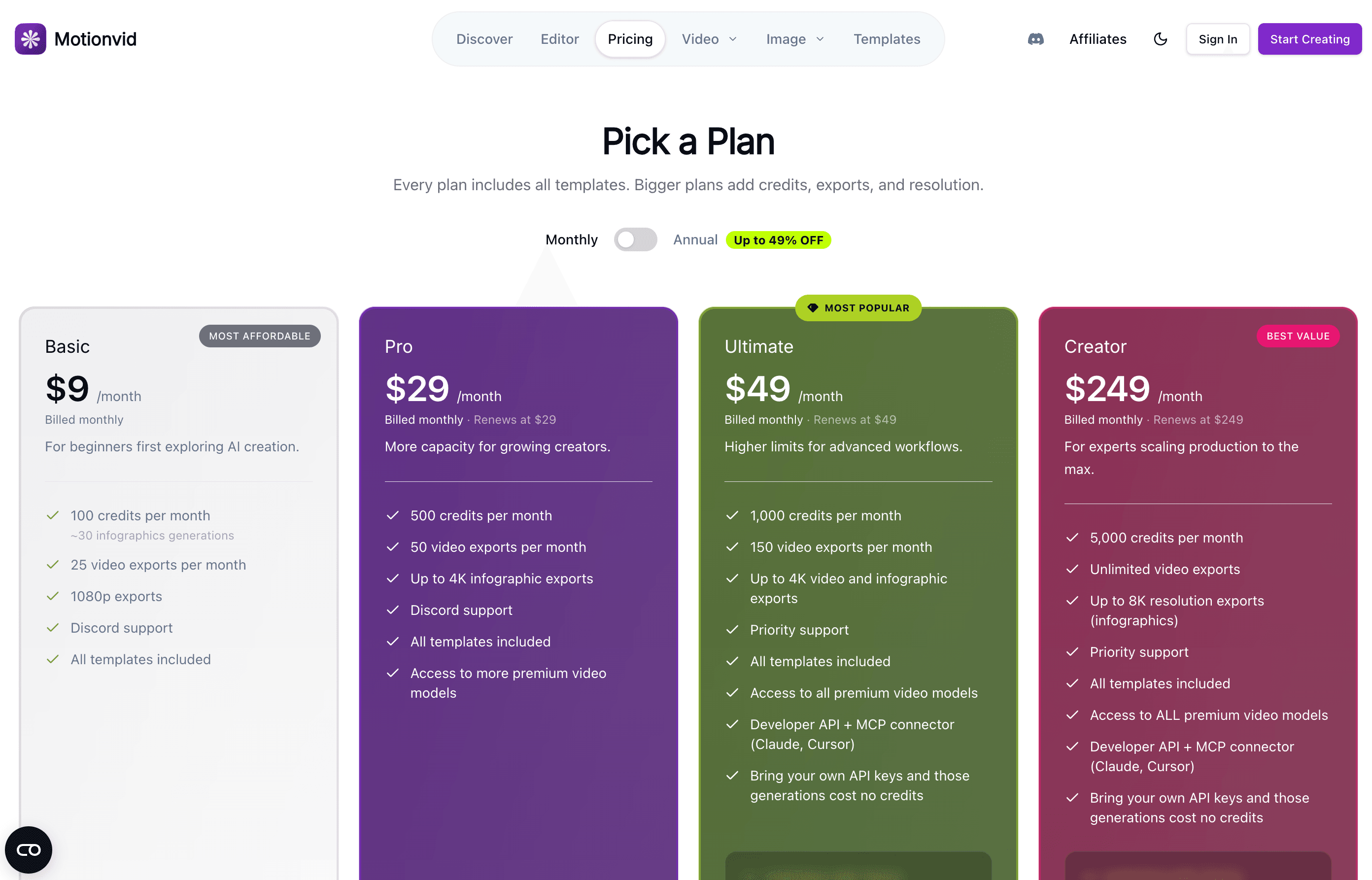
Motionflare gives new accounts 10 one-time credits with no card, for a watermarked browser preview up to 15 seconds. Pay as you go from $15 or subscribe from $29/month. MotionVid’s August 2026 pricing snapshot lists no free tier; Basic at $9/month is the lowest published paid entry.
MotionVid plans below are an August 2026 snapshot backed by a captured pricing screen. Credits and export caps are not interchangeable with Motionflare credits.
Motionflare vs MotionVid.ai at a glance
| Motionflare | MotionVid.ai | |
|---|---|---|
| Best for | On-brand marketing, product, and ads videos from a live website or one sentence | Prompt-led animated explainers and infographics, plus editing footage you already have |
| Output style | One scored motion-graphics video built from website assets and brand cues | Animated graphics with narration and music, in template styles that emulate well-known channels |
| Starting point | A live website URL, or one sentence, in a guided web workflow | A text prompt, uploaded footage, or source documents (PDF, CSV, plain text) and images |
| Brand matching | Automatic in Website mode, reads logo, colors, copy, and screenshots from the URL | Reusable brand kits and saved voices you set up on the account |
| Editing control | Chat revisions of the video in the browser | Storyboard approval, natural-language edits that regenerate only what you name, plus a timeline for your own footage |
| MCP / API | Web app only | REST API and a hosted MCP server, on Ultimate, Creator, and AppSumo Tier 5+ |
| AI avatars | None, no synthetic presenters | None; animated graphics and footage editing |
| Free evaluation | 10 one-time credits; watermarked browser preview up to 15 seconds | No free tier listed on the pricing page; Basic at $9/mo is the lowest paid entry |
| Export | 1080p (2 credits) or 4K (3 credits) MP4 without watermark, plus public share links. Videos are priced per finished second, by model, no monthly export cap beyond credits | 1080p on Basic, up to 4K video on Ultimate and above, capped at 25 / 50 / 150 exports a month by plan |
| Pricing | $15 pay as you go (Flex, 40 credits), or $29/mo (Pro, 100 credits per month); credits never expire | Basic $9/mo (100 credits), Pro $29/mo (500), Ultimate $49/mo (1,000), Creator $249/mo (5,000); credits do not roll over |
MotionVid.ai details verified as of August 2026 from public pricing and product pages — check the vendor’s site for current details.
When MotionVid.ai is the right choice
MotionVid.ai is the better choice when:
- You want the cheapest monthly entry point. Basic is $9 a month, well below any Motionflare subscription.
- You need to edit footage you already shot. MotionVid has a timeline for your own clips; Motionflare only generates.
- You want to drive generation from code or an agent. MotionVid publishes a REST API and a hosted MCP server for Claude, Cursor, and other clients; Motionflare has neither.
- You want to bring your own model API keys. Ultimate and Creator let you attach your own keys, and those generations cost no MotionVid credits.
- You want infographics and stills alongside video, including 8K infographic exports on the top plan.
Where Motionflare fits better
Your website is the brief
Motionflare starts from a public URL and reads the logo, palette, copy and screenshots off the page, then writes one video from that material. MotionVid grounds generation on prompts, uploaded documents and a brand kit you configure by hand.
Try without a subscription
Motionflare includes 10 one-time signup credits with no credit card, enough to generate a watermarked preview up to 15 seconds. MotionVid lists no free tier on its pricing page, so the first look costs at least $9.
Export without a subscription
A $15 Motionflare credit pack buys 40 credits that never expire and unlocks watermark-free 1080p or 4K export with no plan. On MotionVid, exports are a monthly allowance attached to a subscription, and unused credits do not carry over.
Motionflare URL-to-video output, not a MotionVid editor cut
- Input
- A public product page URL
- Output
- A guided marketing video with brand type, product UI, and voice-over
What is MotionVid.ai?
MotionVid.ai describes itself as “Your AI Motion & Video Editor”, generating animated videos with narration and music from a prompt. It offers four creation modes: Motion Graphics for graphics with optional clips, AI Director for cinematic AI footage, Single Graphic for one animated scene, and Edit My Video for combining your own footage with AI graphics.
Its template library leans into recognizable formats: paper cut-out storytelling, map animations with routes and markers, animated character explainers, 3D battle maps, collage title cards, and hand-drawn sketch explainers. The product page also offers style presets that emulate well-known YouTube channels. All templates are included on every plan.
Alongside video it produces infographics, which is where the top plan’s 8K export ceiling applies. Video exports top out at 4K on Ultimate and Creator.
MotionVid pricing in 2026: Basic, Pro, Ultimate, Creator
As published on motionvid.ai/pricing and verified in August 2026, MotionVid sells four monthly plans. Basic is $9 per month for 100 credits, 25 video exports, and 1080p output. Pro is $29 per month for 500 credits, 50 video exports, and up to 4K infographic exports. Ultimate is $49 per month for 1,000 credits, 150 video exports, and up to 4K video and infographic exports. Creator is $249 per month for 5,000 credits, unlimited video exports, and up to 8K infographic exports.
Annual billing is advertised at up to 49% off and adds bonus monthly credits: +15 on Basic, +75 on Pro, +150 on Ultimate, +750 on Creator. Annual plans also unlock unlimited generations on several image models, unlimited background removals from Pro up, and unlimited upscales on Ultimate and Creator. Credits reset each cycle and unused credits do not carry over.
Every plan gets every model; the plans differ in how many credits you get, not which models you can use. MotionVid publishes sample per-generation costs next to its plans: Miltos 5.0 at about 10 credits a generation, Miltos 4.0 at 5, Animora Standard at 8 credits per 4 seconds, Animora Pro at 18 credits per 4 seconds, Nano Banana at 2, Nano Banana 2 and Grok at 3, Nano Banana Pro and Motionvid Photographer at 6, and GPT Image 2 between 1 and 10.
We do not convert MotionVid credits into Motionflare credits on this page. The two systems price different units (per generation and per 4 seconds of AI footage on one side, per second of finished video by model, plus per export, on the other), so any exchange rate would be invented rather than sourced. Compare the entry price, the export allowance, and what your own brief actually consumes on each.
MotionVid API and MCP
MotionVid publishes a REST API and a hosted MCP server at motionvid.ai/mcp, both gated to Ultimate, Creator, and AppSumo Tier 5+. Requests below that tier return a 403. The MCP server speaks Streamable HTTP, authenticates over OAuth 2.1 with PKCE or an mvk_ bearer key, and exposes tools including create_video, edit_video, approve_video, list_voices, and get_credit_balance, so Claude, Claude Code, Cursor, and VS Code can drive generation directly.
On the REST side, POST /v1/videos creates an async job and returns a job id; you poll it or take a webhook, then pull the finished MP4. GET /v1/videos/{id}/frames returns per-scene stills as a filmstrip. POST /v1/videos/{id}/edit takes a natural-language revision and regenerates only what the instruction names, returning a new job id. Setting storyboard: true pauses the job at the cast sheets and again at the storyboard stills until you approve or send changes; paused jobs never expire.
Grounding inputs are documented as URLs pointing at documents (PDF, CSV, or plain text, up to five) and images (up to twenty), not arbitrary web pages. Brand kits carry a website_url field, but the reference presents it as kit metadata rather than a generation input. Webhooks cover render.completed, render.failed with automatic credit refunds, video.completed, video.failed, and video.canceled, retried three times with exponential backoff.
Motionflare has no public API and no MCP server. It is operated through its web app. If calling video generation from code or from an agent is a hard requirement, MotionVid is the one built for it.
How to choose between MotionVid and Motionflare
The two tools overlap on animated explainers and diverge everywhere else. MotionVid is the broader editor: more creation modes, a timeline for your own footage, infographics, a wider model menu, and an API. Motionflare is the narrower one: a public product URL goes in, and one scored video comes out with its look drawn from the source brand.
Do not compare feature lists alone. Give both tools the same brief, the same target duration, and the same audience, then compare how much correction the first draft needs and what the export you actually want costs. Motionflare lets you run that test with 10 one-time signup credits and no card. MotionVid’s cheapest entry is Basic at $9 a month.
If you want a URL as the input rather than a prompt, see Motionflare’s URL to video workflow for what it reads off a public page and what it cannot read from a login-gated app.
How to try Motionflare
- 1Create a free Motionflare account. No credit card required.
- 2Paste a live website URL, or describe the video you want in one sentence.
- 3Choose the length and format, and turn on narration if you want a voice.
- 4Preview the video in the browser and request changes in chat. Free accounts get a watermarked preview up to 15 seconds.
- 5Export when you are ready: pay as you go from $15 with no subscription, or subscribe from $29/month for ongoing work. Both give watermark-free 1080p or 4K.
Frequently asked questions
What is MotionVid.ai?
MotionVid.ai is an AI motion and video editor. It generates animated graphics with narration and music from a prompt, and it edits footage you upload. Creation modes cover Motion Graphics, AI Director for cinematic AI footage, Single Graphic for one animated scene, and Edit My Video for mixing your own clips with AI graphics. It also produces infographics.
How much does MotionVid cost?
As of August 2026, MotionVid lists four monthly plans: Basic at $9 for 100 credits and 25 video exports, Pro at $29 for 500 credits and 50 exports, Ultimate at $49 for 1,000 credits and 150 exports, and Creator at $249 for 5,000 credits and unlimited exports. Annual billing is advertised at up to 49% off with bonus monthly credits on every tier.
Is MotionVid free?
The MotionVid pricing page lists no free tier as of August 2026. The intro line mentions starting free, but no free plan or credit allowance is published, so Basic at $9 a month is the lowest confirmed entry point. Motionflare gives 10 one-time signup credits with no card, for a watermarked preview up to 15 seconds — not a watermark-free download.
How do MotionVid credits work?
Credits are spent per generation and reset each billing cycle; unused credits do not carry over. Every plan can use every model, so the plans differ by credit volume rather than model access. MotionVid publishes sample costs: Miltos 5.0 at about 10 credits per generation, Miltos 4.0 at 5, Animora Standard at 8 credits per 4 seconds, Animora Pro at 18 per 4 seconds, and image models between 1 and 10.
Does MotionVid have an API or MCP server?
Yes, both, on Ultimate, Creator, and AppSumo Tier 5+. The REST API creates async video jobs with POST /v1/videos, supports natural-language edits that regenerate only what you name, optional storyboard approval pauses, and signed webhooks. The MCP server is hosted at motionvid.ai/mcp and works with Claude, Claude Code, Cursor, and VS Code. Plans below Ultimate get a 403.
Can MotionVid make a video from a website URL?
Its marketing describes pointing the API at a URL, but the published API reference documents grounding inputs as document URLs (PDF, CSV, or plain text, up to five) plus images, not arbitrary web pages. Motionflare’s Website mode is built for a public URL: it reads the logo, colors, copy and screenshots from the page and writes one video from them.
MotionVid vs Motionflare: which should I use?
MotionVid is the broader editor: more creation modes, a timeline for footage you shot, infographics, more models, and an API. Motionflare is narrower and more guided: a public product URL or written idea goes in, and an on-brand scored video comes out. Pick MotionVid for range and automation, Motionflare for turning an existing website into a marketing video.
Can I export without a subscription?
On MotionVid, exports are a monthly allowance attached to a plan: 25 on Basic, 50 on Pro, 150 on Ultimate, unlimited on Creator. On Motionflare you can buy a $15 credit pack (40 credits that never expire) and export at 1080p or 4K with no watermark and no subscription, or subscribe from $29 a month for ongoing work.
What resolution can MotionVid export?
Basic exports at 1080p. Pro adds up to 4K infographic exports. Ultimate and Creator export video up to 4K, and Creator goes to 8K for infographics. Motionflare exports 1080p for 2 credits or 4K for 3 credits on Flex or a subscription, with no monthly export cap beyond your credit balance.
Does MotionVid support bring-your-own API keys?
Yes, on Ultimate and Creator. You attach your own model API keys and those generations cost no MotionVid credits, which is useful if you already hold provider credit. Motionflare does not offer BYOK; model cost is folded into its per-second credit rate, which ranges from 0.5 credits a second on DeepSeek V4.1 Flash to 3.6 on GPT-6 Astra and Claude Fable 5.1, with Claude Opus 5.5, the paid default, at 1.8.
Your idea deserves a clear story.
Create a complete marketing video from a URL or one sentence, with a shaped story, designed scenes, voice, sound, and motion.
Create your video